Admin Transactions
The Transactions section gives you a complete record of all financial activity on the platform — every payment made by a consumer, every commission collected, and every payout to a provider. Use it to investigate payment issues, process manual refunds, and reconcile platform revenue.
Accessing Transactions
Go to Admin > Transactions to see all platform-wide payment records. The list defaults to the most recent transactions. Use filters to narrow by date range, agency, provider, consumer, transaction type, or status.
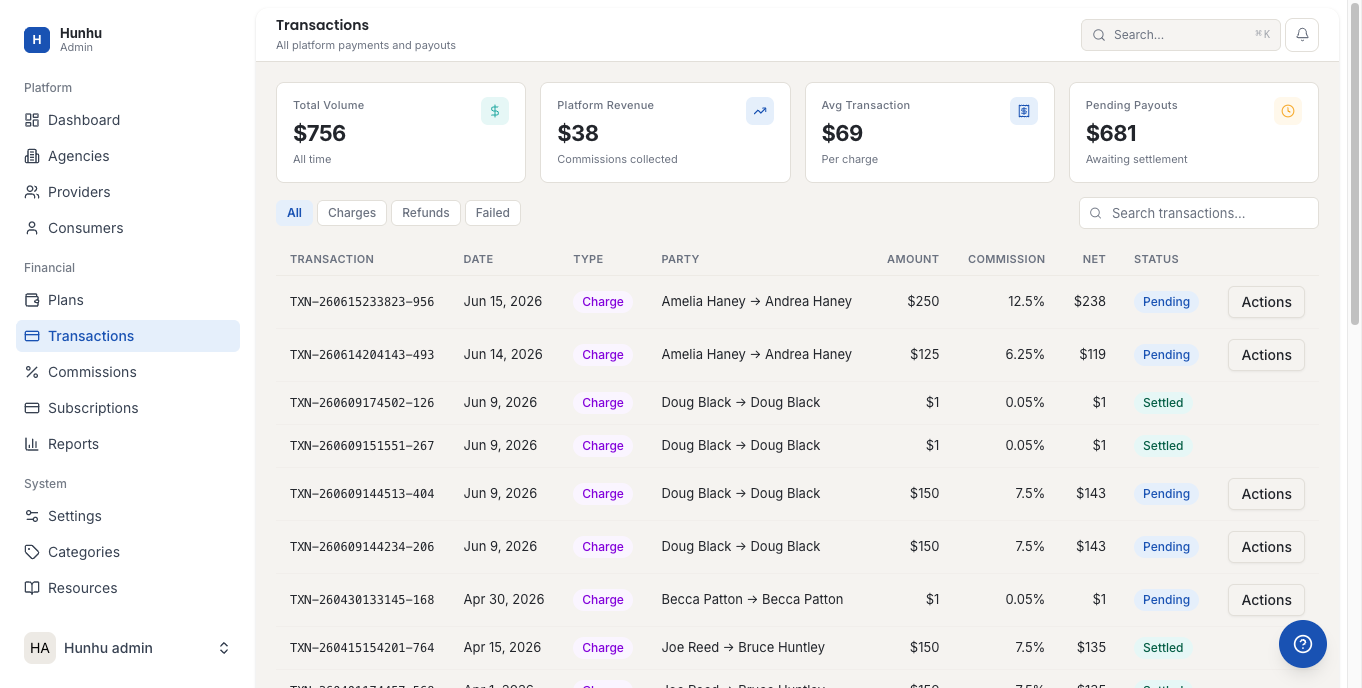
Transaction Types
- Booking Payment — A consumer paid for a session.
- Package Purchase — A consumer paid for a bundle of sessions.
- Refund — A payment was returned to a consumer.
- Commission Collected — Agency commission deducted from a booking.
- Provider Payout — Net earnings transferred to a provider via Stripe.
- Subscription Payment — Agency paid their platform subscription fee.
- Dispute / Chargeback — A payment is under dispute via the card network.
Viewing a Transaction
Click any transaction to see its full details, including:
- The consumer, provider, and agency involved.
- The service booked and booking date.
- The gross amount, commission deducted, and net amount.
- The Stripe transaction ID — useful for cross-referencing in the Stripe dashboard.
- Current status and any history of status changes.
Processing a Manual Refund
To issue a refund for a payment:
- Open the transaction record.
- Click Issue Refund.
- Select whether to refund the full amount or a partial amount.
- Enter the reason for the refund.
- Confirm.
The refund is processed via Stripe and appears on the consumer's bank statement within 3-5 business days. A refund record is created in the transactions list automatically.
Disputed Transactions
When a consumer raises a chargeback with their bank, the transaction is flagged as Disputed. You have a limited window to respond to the dispute through Stripe. Navigate to the Stripe dashboard using the Stripe transaction ID from the Hunhu transaction record to manage the dispute response.
Exporting Transactions
All transaction data can be exported to CSV from the Transactions page. Use exports for bookkeeping, finance reconciliation, or sharing data with your accountant. The export includes all fields visible in the detail view.
Still need help?
Our support team is here for you. Send us a message and we'll get back to you within 48 hours.