Managing Consumers (Admin)
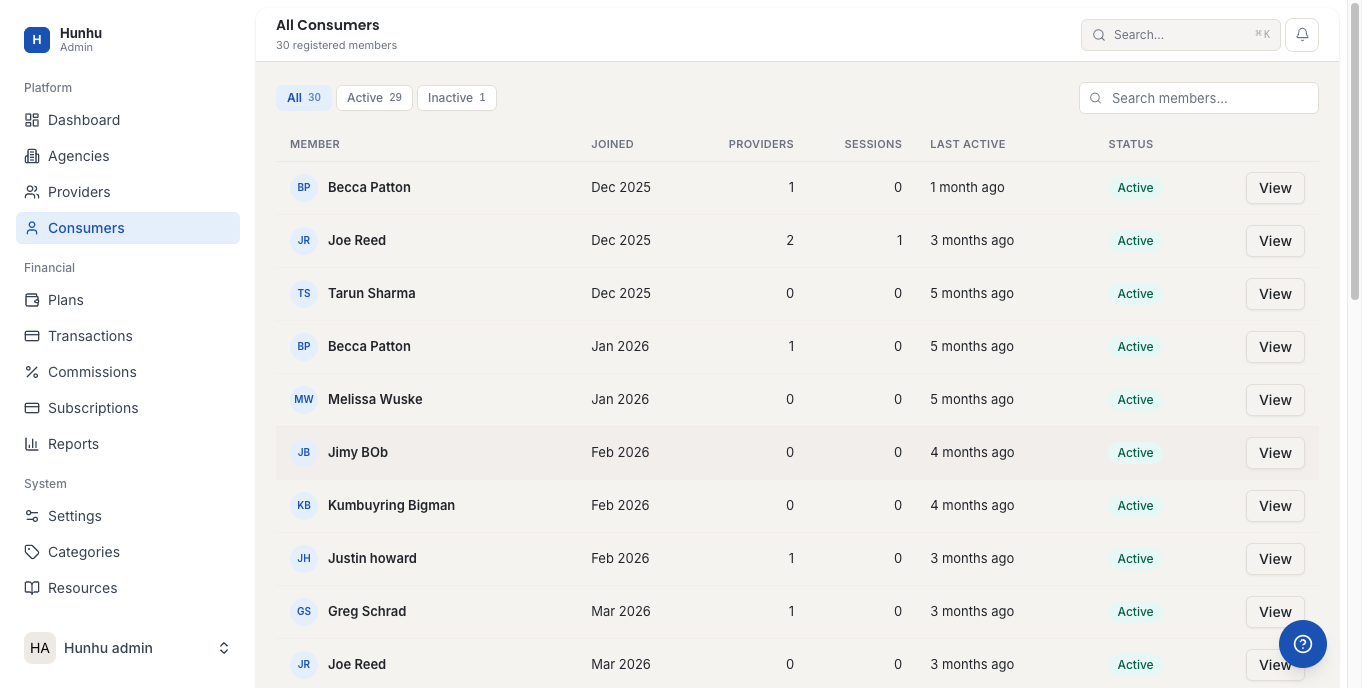
The Admin portal gives you a platform-wide view of all consumer (client) accounts across every agency on Hunhu. Use this section to look up accounts, assist with access issues, review activity, and take action when needed.
Viewing All Consumers
Go to Admin > Consumers to see all consumer accounts on the platform. Filter by agency, status, or date created to narrow the list.
Viewing a Consumer Record
Click any consumer to open their record. The record includes:
- Personal information (name, email, location).
- The agency they belong to.
- Booking history — all sessions booked, completed, or cancelled.
- Payment history — all transactions, including refunds.
- Enquiry history.
- Account status.
Resetting a Consumer's Password
If a consumer cannot log in and the self-service password reset is not working:
- Open the consumer record.
- Click Send Password Reset.
- A reset email is sent to the consumer's registered email address.
Deactivating a Consumer Account
If a consumer requests account deletion or needs to be removed for policy reasons:
- Open the consumer record.
- Click Deactivate Account.
- Confirm and optionally add a note.
Deactivated consumers cannot log in. Their booking history is retained for record-keeping purposes subject to your data retention policy. Active bookings should be resolved before deactivating the account.
Investigating Payment Issues
If a consumer reports a payment problem, open their record and go to the Transactions tab. You can see all their payment records, linked Stripe charges, and any failed or disputed transactions. For refund processing, use the Transactions section in the Admin portal.
Impersonating a Consumer Account
You can impersonate a consumer account to replicate issues they are experiencing. See the Admin Impersonation Guide for full instructions.
Still need help?
Our support team is here for you. Send us a message and we'll get back to you within 48 hours.