Admin Plans
Subscription plans define the features, limits, and pricing available to each agency on the platform. By creating different plan tiers, you can offer agencies scaled access — from a basic directory to a full-featured enterprise experience — and generate predictable recurring revenue from each tier.
Accessing Plans
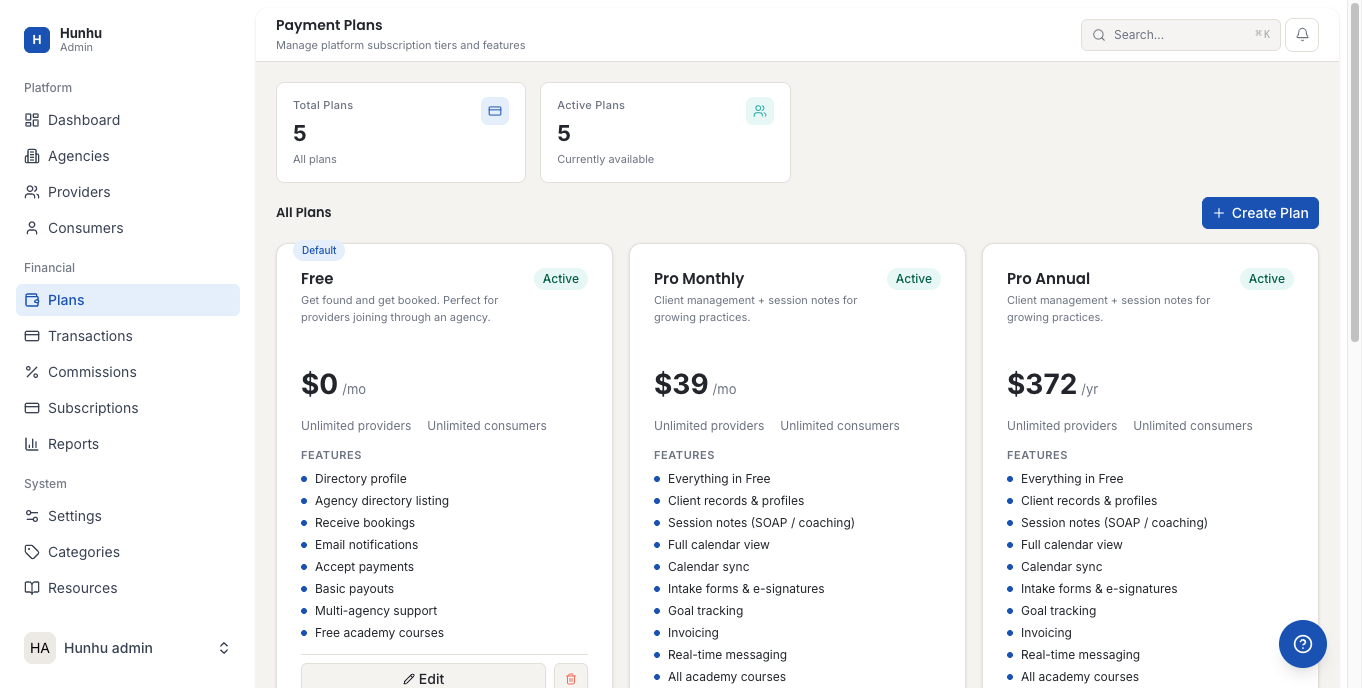
Go to Admin > Plans to see all current subscription plans. Each plan entry shows:
- Plan name and description.
- Monthly and annual pricing.
- Feature limits (provider cap, consumer cap, custom domain, analytics access, etc.).
- Number of agencies currently on this plan.
- Status (Active, Archived).
Creating a New Plan
- Click New Plan.
- Enter:
- Plan Name — e.g. "Starter", "Growth", "Enterprise".
- Description — What this plan is for and who it suits.
- Monthly Price and Annual Price.
- Provider Limit — Maximum number of providers the agency can add.
- Consumer Limit — Maximum number of consumer accounts.
- Feature Access — Toggle which features are available (custom domain, marketing tools, pipeline, advanced reporting, etc.).
- Click Create Plan.
Editing a Plan
You can edit the name, description, and pricing of a plan at any time. Changes to feature limits take effect immediately for all agencies on that plan. Pricing changes only affect new subscriptions and renewals — agencies currently on the plan at the old price are not affected until their next billing cycle unless you manually update them.
Archiving a Plan
To stop offering a plan to new agencies:
- Open the plan record.
- Click Archive Plan.
Archived plans are no longer selectable for new agencies, but agencies already on the plan continue without disruption. Do not delete a plan that has active agencies — archive it instead.
Assigning a Plan to an Agency
When creating or editing an agency, select the plan from the Subscription Plan dropdown. You can also change an agency's plan from their record in Admin > Agencies. Plan downgrades that reduce limits below an agency's current usage require manual review before confirming.
Free Trials and Promotional Access
To give an agency temporary free access to a higher plan, set a trial end date on their account from the agency record. When the trial ends, the agency automatically reverts to their assigned paid plan.
Still need help?
Our support team is here for you. Send us a message and we'll get back to you within 48 hours.