Managing Agencies
Managing agencies is one of the core functions of the Admin portal. Every client-facing directory on the Hunhu platform belongs to an agency. From this section, you can create new agencies, configure their settings, impersonate accounts for troubleshooting, and suspend or deactivate agencies as needed.
Viewing All Agencies
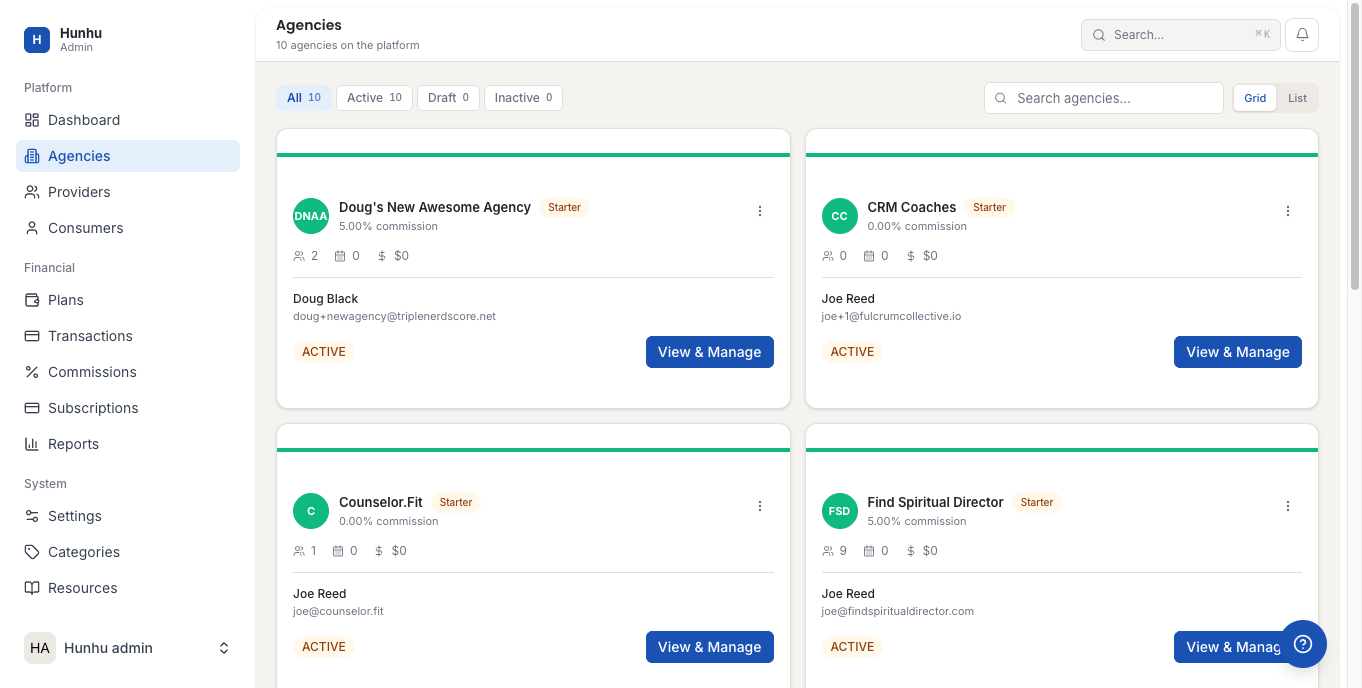
Go to Admin > Agencies to see a list of all agencies on the platform. Each entry shows:
- Agency name and logo.
- Status (Active, Suspended, Pending Setup).
- Number of providers and consumers in the agency.
- Date created.
- Subscription plan.
Creating a New Agency
- Click Add Agency in the top right.
- Fill in the agency details:
- Agency Name — The organization name. This appears throughout the platform and in client-facing communications.
- Admin Email — The email address for the agency administrator. An invitation to set up their account is sent here.
- Subscription Plan — Select the plan to assign to this agency. Plans control feature limits, provider caps, and billing.
- Commission Rate — The default commission percentage taken on provider bookings. The agency can set custom rates per provider from their portal.
- Click Create Agency.
The agency administrator receives an email invitation with a link to complete their setup — including branding, custom domain, and Stripe connection.
Viewing an Agency's Details
Click any agency in the list to open their record. The agency detail view shows all their settings, providers, consumers, active bookings, and billing status. You can edit any setting from this view.
Suspending an Agency
If an agency has unpaid invoices, violated platform terms, or needs to be temporarily disabled:
- Open the agency record.
- Click Suspend Agency.
- Select a reason and confirm.
A suspended agency's directory is taken offline. Providers and consumers cannot log in. Existing bookings are preserved but new bookings cannot be made.
Impersonating an Agency Account
As a platform admin, you can impersonate any agency account for troubleshooting or support purposes. See the Admin Impersonation Guide for full instructions. A "Return to Admin" banner always appears during impersonated sessions.
Agency Billing
Subscription billing for agencies is managed through your platform's Stripe integration. Agency invoices and payment status are visible from the agency record's Billing tab. For billing disputes or manual adjustments, use the Transactions section under the Admin portal.
Still need help?
Our support team is here for you. Send us a message and we'll get back to you within 48 hours.