Managing Providers (Admin)
The Admin portal gives you a platform-wide view of all providers across every agency on Hunhu. You can view provider details, check their status, move them between agencies if needed, and take action on any account — without having to impersonate an agency first.
Viewing All Providers
Go to Admin > Providers to see a complete list of every provider account on the platform. Filters let you narrow the view by:
- Agency.
- Status (Active, Paused, Pending Approval).
- Category or specialty.
- Date joined.
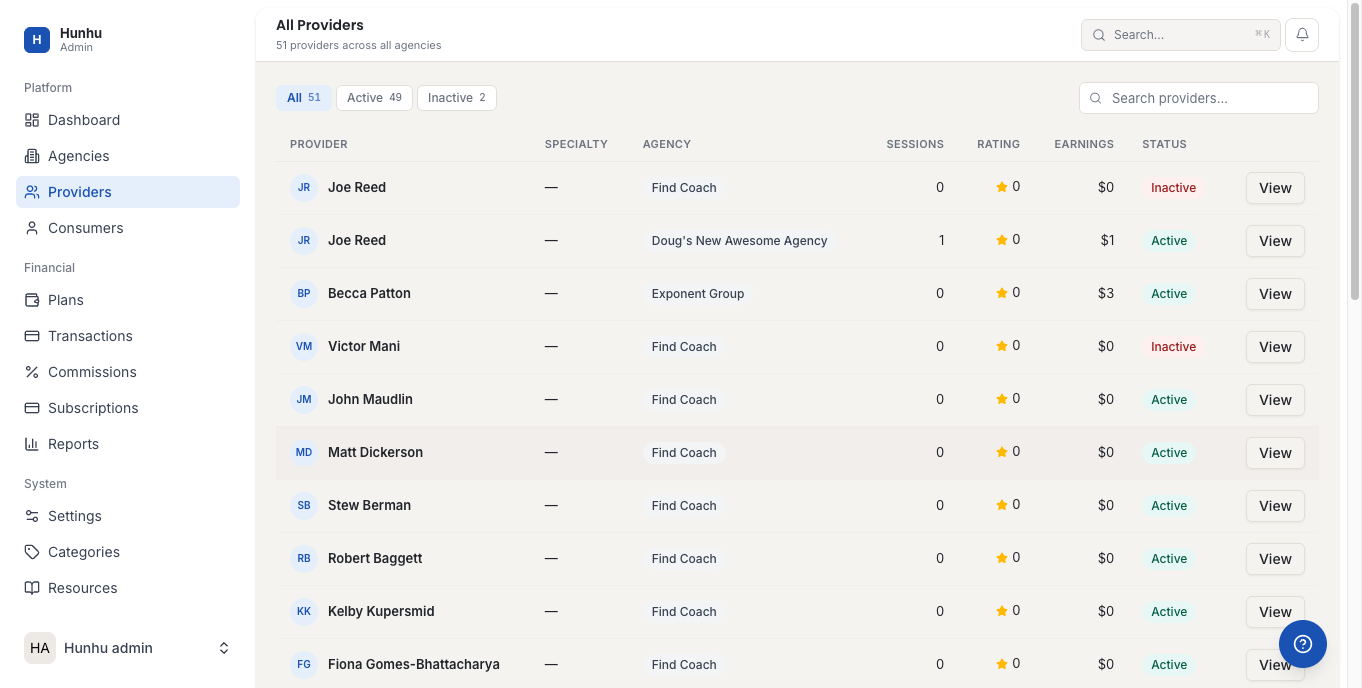
Viewing a Provider Record
Click any provider to open their full record, which includes:
- Profile information (bio, categories, credentials).
- Which agencies they belong to.
- Offerings (active services, packages, add-ons).
- Booking history and session count.
- Earnings and commission history.
- Account status and login details.
Approving a New Provider
If your platform requires admin approval before a provider can go live:
- New providers awaiting approval appear with a Pending Approval status.
- Open the provider record and review their profile.
- Click Approve to activate their account, or Reject with a reason.
- The provider receives an email notification with the outcome.
Suspending or Deactivating a Provider
To suspend a provider (temporarily disable their account):
- Open the provider record.
- Click Suspend Account.
- Enter a reason and confirm.
A suspended provider cannot log in and their profile is hidden from all agency directories. Existing bookings are preserved. To permanently deactivate an account, contact your platform support team — this action is irreversible and requires additional confirmation.
Moving a Provider Between Agencies
Providers can belong to more than one agency. If you need to add a provider to an additional agency or remove them from one:
- Open the provider record.
- Go to the Agencies tab.
- Add or remove agency associations as needed.
Provider Support
If a provider contacts support about an account issue, use the impersonation tool to log into their account and replicate the problem. See the Admin Impersonation Guide for how to do this safely.
Still need help?
Our support team is here for you. Send us a message and we'll get back to you within 48 hours.