Admin Settings
Platform Settings are the global configuration options that control how the Hunhu platform behaves for all agencies, providers, and consumers. These settings sit above agency-level settings — they apply platform-wide unless an agency has a specific override.
Accessing Platform Settings
Go to Admin > Settings to see all global configuration sections. Settings are grouped into categories in the left navigation.
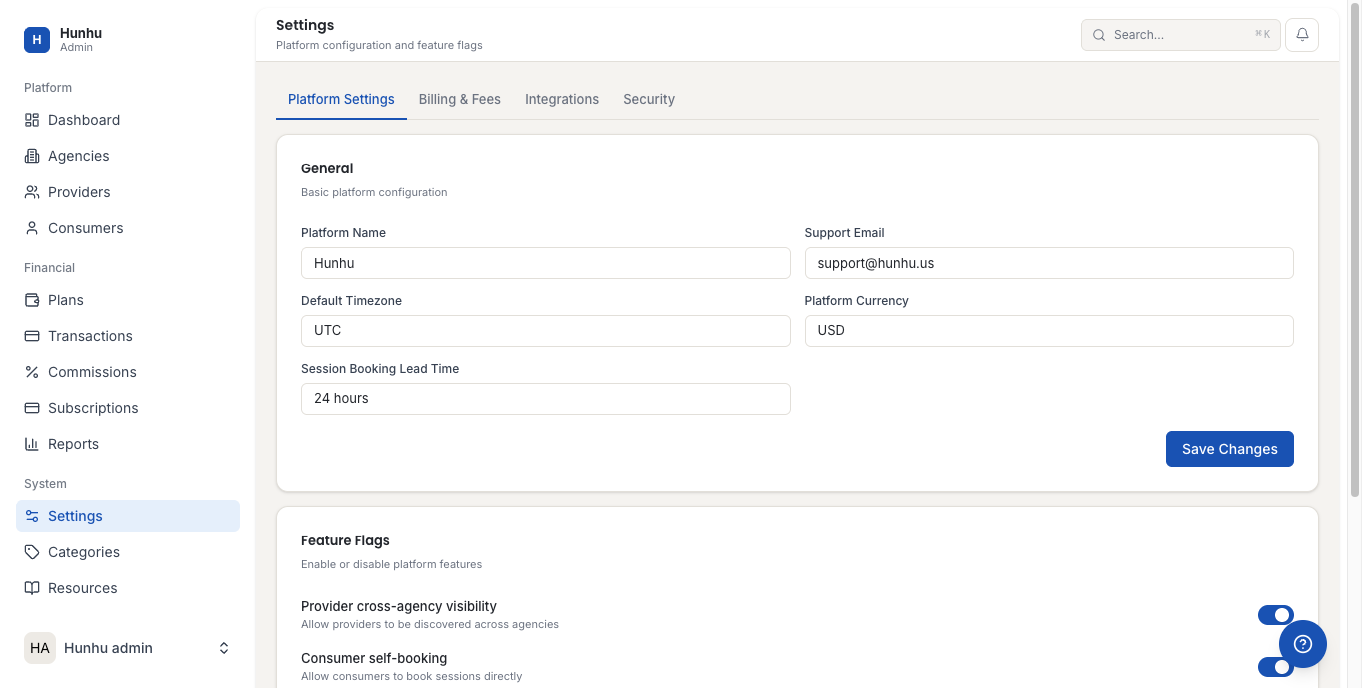
General Settings
- Platform Name — The internal name used in admin notifications and system emails.
- Support Email — The email address used in platform-level support communications.
- Default Timezone — The timezone used for platform-level reports and scheduling.
- Default Language — The default language for the platform interface.
Billing Settings
- Default Commission Rate — Starting commission rate applied when a new agency is created.
- Minimum Commission Rate / Maximum Commission Rate — The range agencies can set. Leave blank to impose no limits.
- Platform Processing Fee — An optional fee the platform charges agencies per transaction, on top of their commission.
- Stripe Configuration — The platform-level Stripe account credentials used to process payments and manage payouts.
- Trial Period Length — Default number of days for new agency free trials.
Provider Approval Settings
- Require Admin Approval — Toggle whether all new provider accounts require platform admin approval before going live, or whether they can activate immediately after agency approval.
- Require Agency Approval — Whether agencies must review and approve new providers joining their network (separate from admin approval).
Email Settings
Configure the transactional email templates and sending domain used for platform-level notifications (password resets, system alerts, subscription confirmations). Agency-level email branding is controlled from each agency's settings.
API Settings
Manage platform API keys and webhook endpoints. Use this if you are integrating Hunhu with external systems (CRM, analytics, payment processors) at the platform level rather than the agency level.
Notification Settings
Configure which events trigger automated notifications and to whom. Platform-level notifications typically go to admin team members, not to agency users.
Maintenance Mode
Enable maintenance mode to take the entire platform offline temporarily while you perform updates or migrations. When maintenance mode is active, all portals show a maintenance message and no new bookings or logins are accepted. Use with caution and communicate downtime to agencies in advance via Announcements.
Still need help?
Our support team is here for you. Send us a message and we'll get back to you within 48 hours.