Admin Commissions
Commissions are the fees agencies deduct from provider earnings when a client pays for a session. As a platform admin, you can set platform-level defaults, view the commission rates configured by each agency, and review commission revenue across the platform.
How the Commission System Works
- A client books a session and pays the session price.
- The agency deducts their commission percentage from the gross booking value.
- The remainder is paid out to the provider via Stripe.
- The platform may also take a processing fee from the agency (configured separately in platform settings).
Example: A £100 session with a 20% agency commission results in £80 paid to the provider and £20 retained by the agency.
Accessing Commission Settings
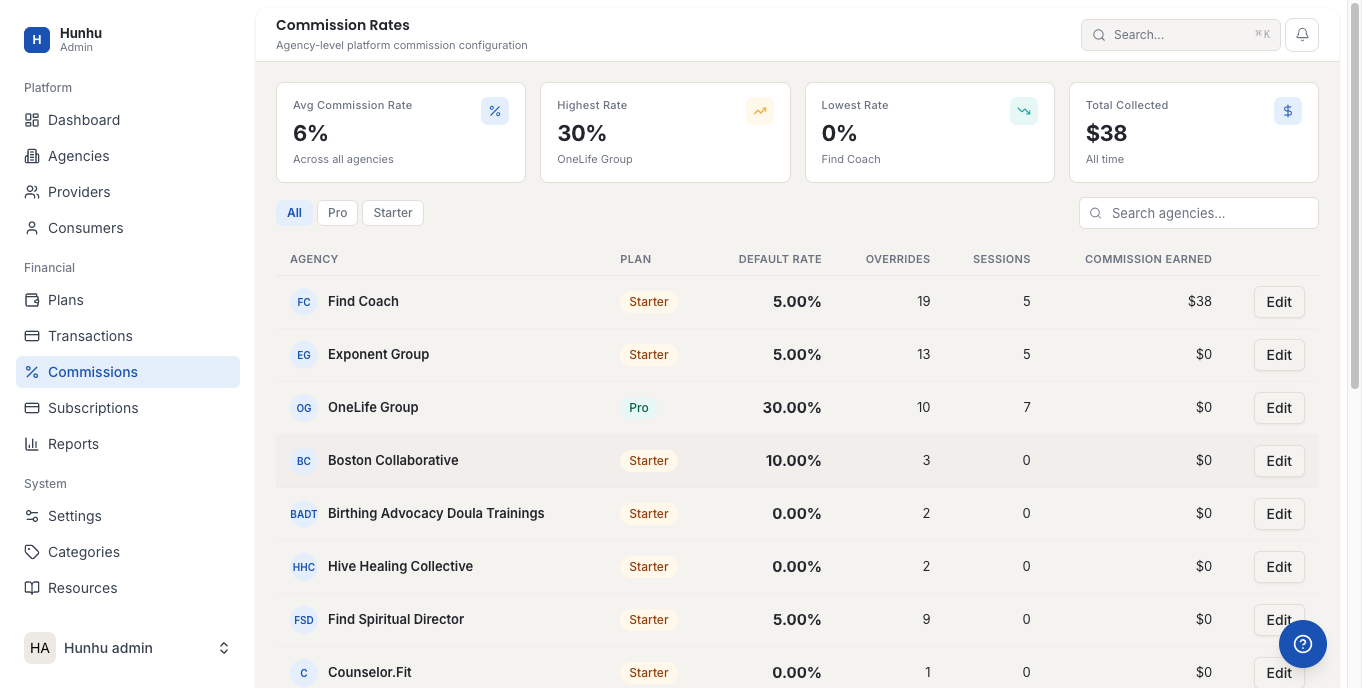
Go to Admin > Commissions to see the platform-level commission defaults and the commission rates configured by each agency.
Setting a Platform Default Commission Rate
The default commission rate is the starting rate applied when a new agency is created. Agencies can change their own commission rate from their portal settings, so this is purely a default starting point — not a cap or floor unless you choose to enforce one.
- Go to Admin > Commissions.
- Update the Platform Default Commission Rate field.
- Save.
This change only affects new agencies created after the update. Existing agencies retain their current rates.
Viewing Agency Commission Rates
The commission table shows all agencies and their current commission rate. Click any agency to view their full commission history and any custom provider-level overrides they have configured.
Commission Revenue Reporting
To see total commission revenue across the platform, go to Admin > Reports > Commission. This report shows:
- Total commission collected platform-wide.
- Commission by agency over a selected period.
- Commission by provider (showing which providers generated the most activity).
Enforcing Commission Limits
If you want to prevent agencies from setting commission rates above or below certain thresholds, configure minimum and maximum commission rate limits in Admin > Settings > Billing. These limits are enforced when agencies update their settings.
Still need help?
Our support team is here for you. Send us a message and we'll get back to you within 48 hours.