Audit Logs
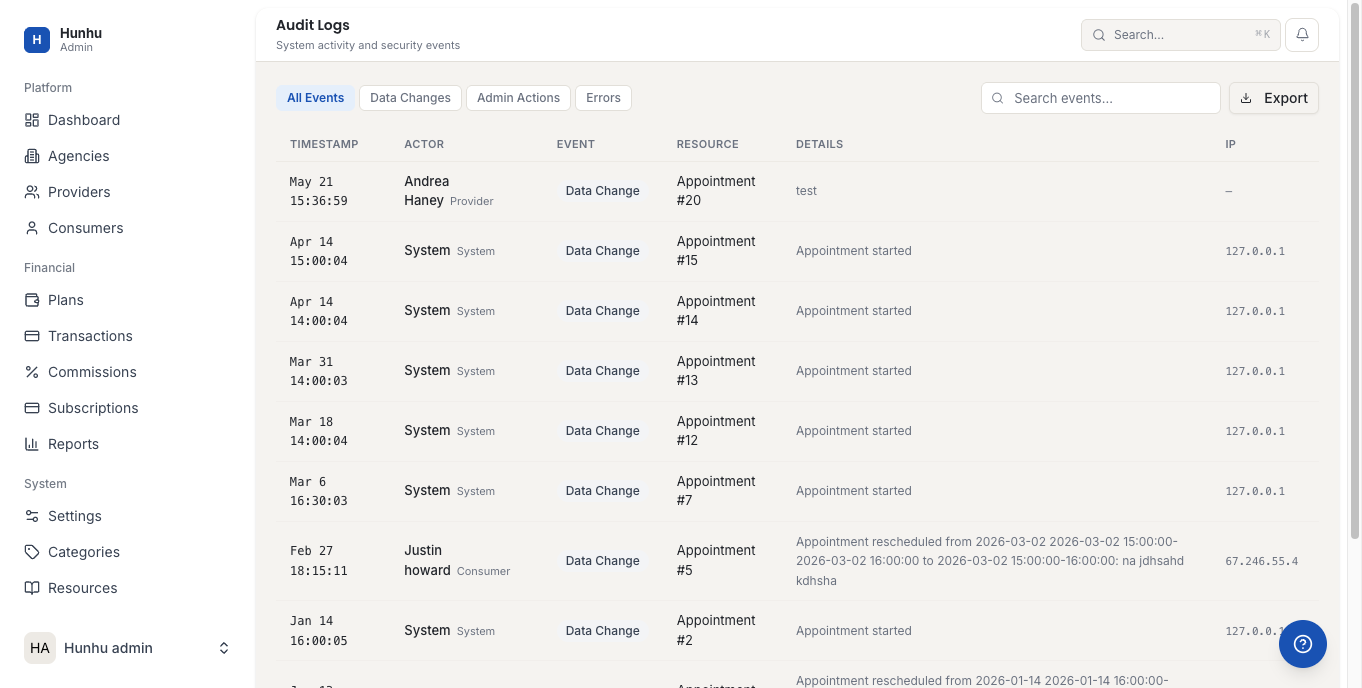
Audit Logs record every significant action taken on the platform, including who did it, when, and what was changed. They are essential for security reviews, compliance investigations, and diagnosing unexpected changes to platform data or configuration.
Accessing Audit Logs
Go to Admin > Audit Logs to search and browse the full activity log. Logs are retained for a minimum of 90 days (longer periods may be available on enterprise plans or via data export).
What is Logged
The audit log captures events across all user types and all areas of the platform, including:
- Account changes — User creation, deletion, role changes, password resets.
- Authentication events — Logins, logouts, failed login attempts, impersonation sessions (start and end).
- Agency actions — Agency creation, suspension, plan changes, settings updates.
- Provider actions — Provider approvals, suspensions, agency associations.
- Financial actions — Refunds issued, plan changes, commission rate changes.
- Content actions — Announcements created or deleted, KB articles modified (if integrated).
- Settings changes — Any change to platform settings, with the old and new values recorded.
- API events — Significant API calls, especially those that modify data.
Searching and Filtering Logs
Use the filter bar to search by:
- Date range — Narrow to a specific time window.
- User — Search for activity by a specific admin, agency user, or provider.
- Event type — Filter to a category of action (authentication, billing, account, settings).
- Target — Search for all actions that affected a specific agency, provider, or consumer record.
Reading a Log Entry
Each log entry shows:
- Timestamp — Exact date and time in UTC.
- Actor — The user who performed the action. Impersonated sessions show both the impersonator and the impersonated account.
- Action — A description of what was done.
- Target — The record that was affected.
- Details — For settings changes, the old and new values are shown. For financial actions, the amounts are included.
Exporting Audit Logs
Audit logs can be exported to CSV by clicking Export with your current filter active. Exports are useful for compliance reviews, security audits, or sharing a specific event history with legal counsel.
Compliance Use Cases
- Investigating who made a specific change to a commission rate or subscription plan.
- Confirming that a data access request (SAR) was fulfilled correctly.
- Demonstrating that only authorized personnel accessed sensitive consumer records.
- Tracing the source of an unexpected refund or payment record change.
For SOC 2 or ISO 27001 audits, your audit logs provide the evidence trail required to demonstrate access controls, least-privilege enforcement, and event monitoring are in place.
Still need help?
Our support team is here for you. Send us a message and we'll get back to you within 48 hours.